Part I: Python Fundamentals
Chapter 2
Python Essentials for Engineers
Get the TL;DR and the key concepts before you dive in — or as a quick review after.
Every engineering discipline has a working language: a set of terms, conventions, and shorthand that practitioners use to communicate precisely. Drilling engineers talk about WOB, ROP, and BHA. Reservoir engineers talk about Sw, Bo, and OOIP. These terms exist because precision matters. An ambiguous instruction on a rig floor can cost lives.
Python has its own working language: variables, data types, functions, and control flow. These are not abstract computer science concepts. They are the building blocks you use to express engineering calculations in code. This chapter teaches each of them through petroleum problems, so that by the end, you can write Python that reads like engineering and runs like software.
infoWhat You Will Learn
- Variables, data types, and operators: how Python stores and manipulates engineering quantities
- Control flow: how to encode engineering decision logic (safe/unsafe, economic/uneconomic)
- Functions: how to write reusable calculations you can trust across projects
- Error handling: how to make your code fail gracefully when real-world data is messy
Variables: Naming Your Engineering Quantities
Six months from now you will reopen this code and either understand it instantly or stare at it as if a stranger wrote it. That difference is almost entirely down to how you name things. A variable is just a named container for a value, but the naming convention you adopt is what keeps engineering code readable long after you have forgotten the details.
In this book, we follow one rule: variable names use petroleum terminology with units appended. When you see mud_weight_ppg, you know exactly what it holds: mud weight in pounds per gallon. When you see tvd_ft, you know it is true vertical depth in feet. There is no ambiguity, no guessing.
Notice the distinction between total_depth_ft and tvd_ft. In a vertical well, measured depth and true vertical depth are the same. In a deviated or horizontal well, measured depth is always greater because the wellbore curves. This matters for pressure calculations: hydrostatic pressure depends on vertical depth, not the path the drill took to get there. Getting this wrong is a common and expensive mistake.
Data Types: What Kind of Value Are You Holding?
Python distinguishes between different kinds of values, and the distinction matters for engineering work.
Why does the type matter? Because certain operations only make sense on certain types. You can multiply porosity thickness_ft to get hydrocarbon pore volume; that is valid arithmetic on two floats. But you cannot multiply well_name reservoir_name; that is meaningless, and Python will tell you so. Type discipline prevents nonsense calculations, which in engineering, prevents nonsense decisions.
Operators: Expressing Engineering Arithmetic
Arithmetic in Python works the way you expect, with one important detail: the difference between / (true division) and // (floor division).
infoHow those f-string format specs work
You will see f-strings throughout this book in forms like f"{value:,.1f}" or f"{name:<20}". Everything after the colon is the format spec, a tiny mini-language for controlling how the value renders. The forms you'll use most:
| Spec | What it does | Example | Output |
|---|---|---|---|
, | Thousands separator | f"{4800:,}" | 4,800 |
.Nf | Fixed-point with N decimals | f"{0.5236:.2f}" | 0.52 |
.N% | Percent with N decimals (×100 first) | f"{0.45:.1%}" | 45.0% |
.Ne | Scientific notation, N decimals | f"{0.000123:.2e}" | 1.23e-04 |
>N | Right-align in width N | f"{42:>5}" | 42 |
<N | Left-align in width N | f"{'OD-1':<10}" | OD-1 |
^N | Centre-align in width N | f"{'A':^5}" | A |
You can combine: f"{cum_bbl:>15,.0f}" is "right-align in 15 columns, thousands separator, no decimals." That's the formatting that makes a printed report look like an engineering report rather than a debug dump.
Comparison and Logical Operators
These are how you express engineering conditions: thresholds, limits, operating windows.
That final line, meets_porosity and meets_perm and meets_viscosity and meets_saturation, is engineering logic expressed in code. The and operator requires every condition to be true. If you used or, only one condition would need to pass, which is a different (and much less conservative) screening philosophy. The choice between and and or is not a coding decision. It is an engineering decision.
Control Flow: Encoding Engineering Decisions
If / Elif / Else: Decision Trees
Every engineering workflow has decision points. Control flow is how you encode them.
The order of the elif checks matters. If you checked water_cut_pct > 70 before oil_rate_bopd < 20, a well producing 5 bopd with 75% water cut would be classified as "High water cut" instead of "Marginal." The marginal production rate is the more urgent concern. Order those checks by priority and the right wells surface first; order them carelessly and an urgent well hides behind a less urgent label.
For Loops: Iterating Over Well Data
When you need to perform the same calculation on multiple wells, depths, or time periods, you use a loop.
info`enumerate` and `zip`: the Pythonic way to loop
You will sometimes see Python code that looks like for i in range(len(xs)): ... xs[i]. That works, but it's an idiom imported from C or Java. Python's preferred forms are:
for x in xs:when you only need the valuefor i, x in enumerate(xs):when you also need the indexfor x, y in zip(xs, ys):when you're walking two (or more) lists together
Use these. They read like English, they're faster, and they make off-by-one errors much harder to write.
Plotted, the same numbers show the decline at a glance:
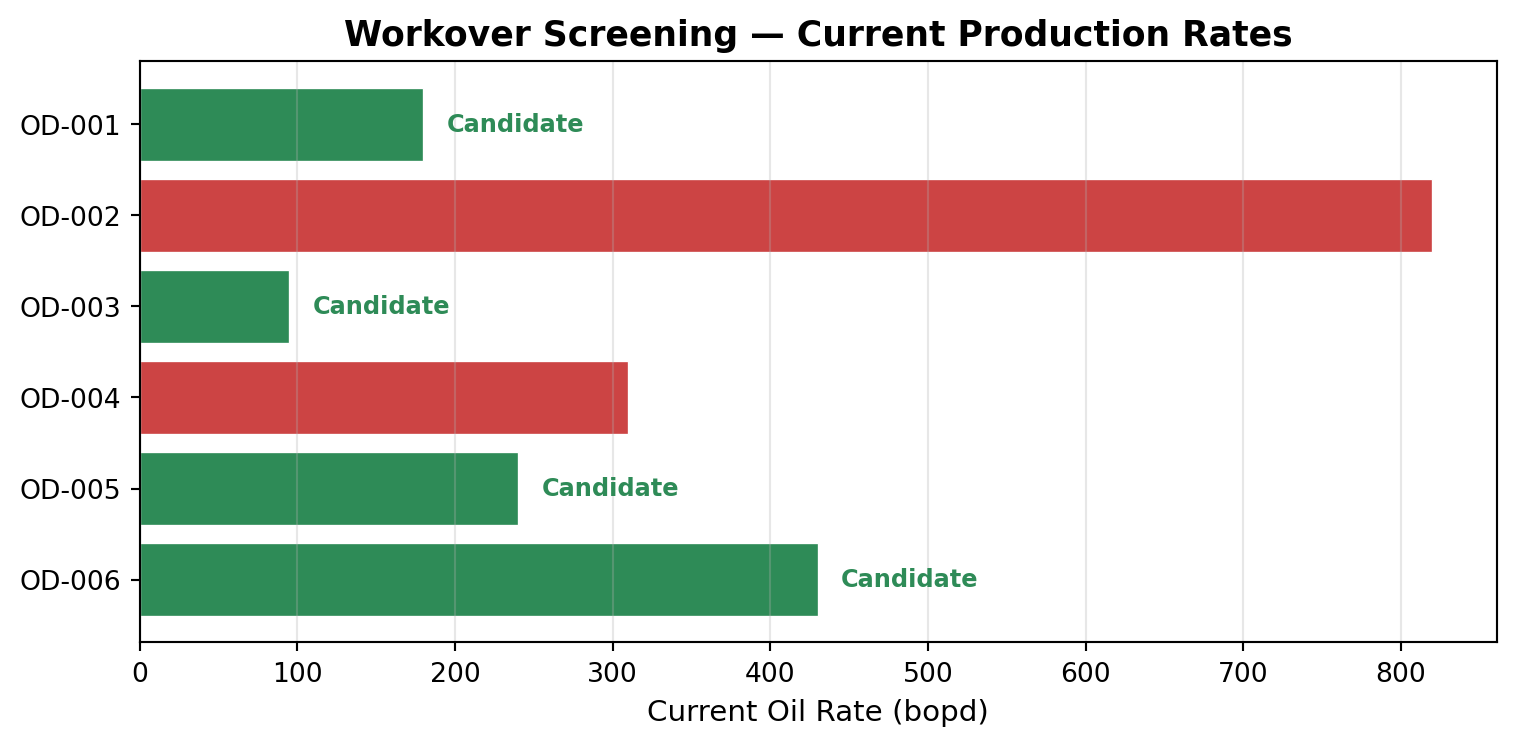
This is a dual-axis production plot, one of the most common visualizations in petroleum engineering. The bars show the monthly rate declining from left to right. The line shows cumulative production growing but flattening. The shape of that decline tells a reservoir engineer a great deal about what is happening underground: how fast pressure is dropping, whether the well is in transient or boundary-dominated flow, whether intervention might be needed.
We study decline curve analysis in depth in Chapter 9. For now the point is narrower: a for loop, a list, and a plotting library are enough to turn a column of monthly rates into a decline curve an engineer can actually read.
While Loops: Iterating Until a Condition Is Met
Some engineering calculations require iteration: you start with a guess, refine it, and repeat until the answer converges. This is where while loops are essential.
Read down the Δf column. The first step takes a big leap; each step after it is far smaller than the one before. Every iteration shrinks the remaining error by a roughly constant factor (linear convergence, the signature of a well-behaved fixed-point iteration). (Newton's method roughly squares the error each step instead, quadratic convergence, but it needs a derivative the Colebrook-White equation does not hand you.) Either way, the whole calculation finishes in a handful of iterations.
info`while ... else`: for "did the loop succeed?"
Python's while (and for) loops support an else clause that runs only when the loop exits normally, i.e., the condition went false without a break. It is the canonical place to handle non-convergence. If you copy this pattern for a different equation and forget to set max_iterations high enough, the else clause raises and you find out immediately. Without it, the loop silently returns whatever junk value it last computed.
The key idea generalizes: some engineering equations cannot be solved directly, so you guess, check, adjust, and repeat. The while loop is the structure that makes this possible.
We will use friction factors extensively in Chapter 15 (Gas Engineering) for pipeline hydraulics and pressure-drop calculations.
Functions: Building Reusable Engineering Tools
Write the hydrostatic-pressure calculation once, correctly, and you should never write it again; every later use becomes a single line that calls it. That is what a function buys you: a named block of code that takes inputs, runs a calculation, and returns a result, turning a one-off into a tool you can trust across projects.
There are several things to notice about how these functions are written:
Type hints (mud_weight_ppg: float) tell the reader what kind of input the function expects. They do not enforce anything at runtime, but they serve as documentation.
Docstrings (the triple-quoted text block) explain what the function does, what it takes, and what it returns. When you or a colleague uses this function six months from now, the docstring is the first thing they read. Write them.
Default parameters (overbalance_psi: float = 200) encode standard engineering practice. A 200 psi overbalance is a common default, but the function lets you override it when conditions require a different margin.
The function name is the calculation name. hydrostatic_pressure is what the function computes. Not calc_p or get_value or func1.
Building a Pressure-Depth Plot: Functions + Visualization
One of the most useful engineering visualizations is a pressure-depth plot. It shows how formation pressure, mud pressure, and fracture pressure vary with depth. The safe operating window for mud weight sits between the formation pressure (below which you get a kick) and the fracture pressure (above which you break the rock).
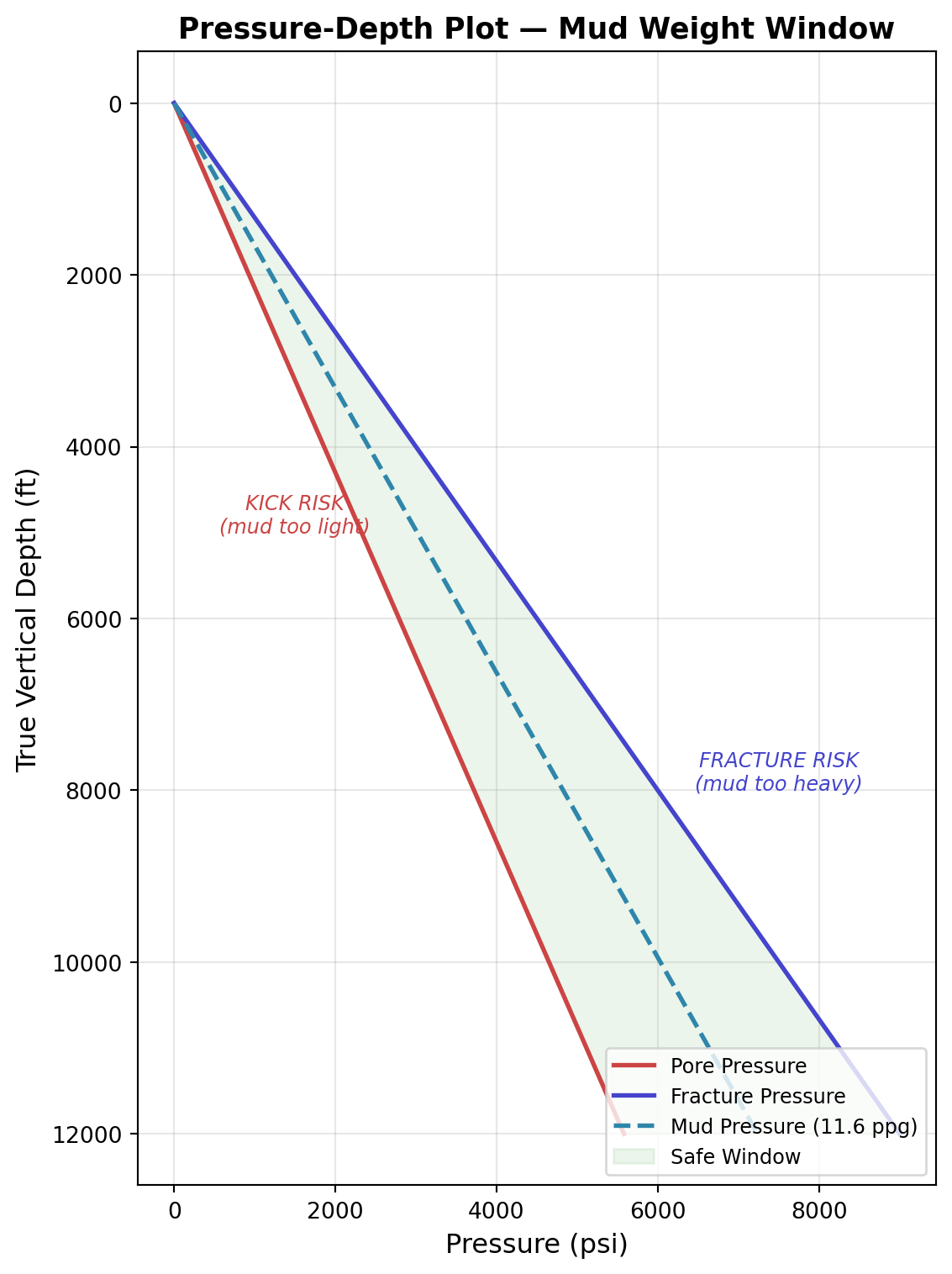
This plot is a direct product of the hydrostatic_pressure function applied across a range of depths. The red line is the formation trying to push fluid into your wellbore. The blue line is the point at which your mud breaks the rock. Your mud pressure (dashed) must stay between the two at every depth.
In reality, these gradients change with depth and geology; they are not straight lines. We will work with real pore pressure and fracture gradient data in later chapters. The principle, however, is the same: the engineer's job is to stay inside that window.
Error Handling: When Real Data Is Messy
Every calculation so far has assumed clean inputs. Real field data is not clean. Sensors fail. Manual entries contain typos. Wells shut in unexpectedly. Your code must handle these situations without crashing, because a crashed analysis pipeline at 2 AM does not help the night-shift engineer who needs answers.
Two records failed. The code did not crash. It told you which records failed and why, then processed the rest. That is the difference between a script that works on clean textbook data and one that survives a real morning production dump.
infoWhy `logging.warning` instead of `print`
When a function discovers something suspicious, the temptation is to print(...) and move on. That works in a notebook. It breaks the moment your code runs in production:
- A nightly batch job has no console;
printoutput disappears. - A web service mixes warnings from many requests, and you cannot tell which is which.
- A surveillance dashboard wants severity levels (INFO / WARNING / ERROR), timestamps, and logger names;
printgives you none of those.
The Python standard library's logging module solves all three. The function says what happened; the project wiring decides where the message lands and how it is formatted. Use print for the result of a calculation; use logging for diagnostics about the calculation.
Putting It All Together: A Well Screening Tool
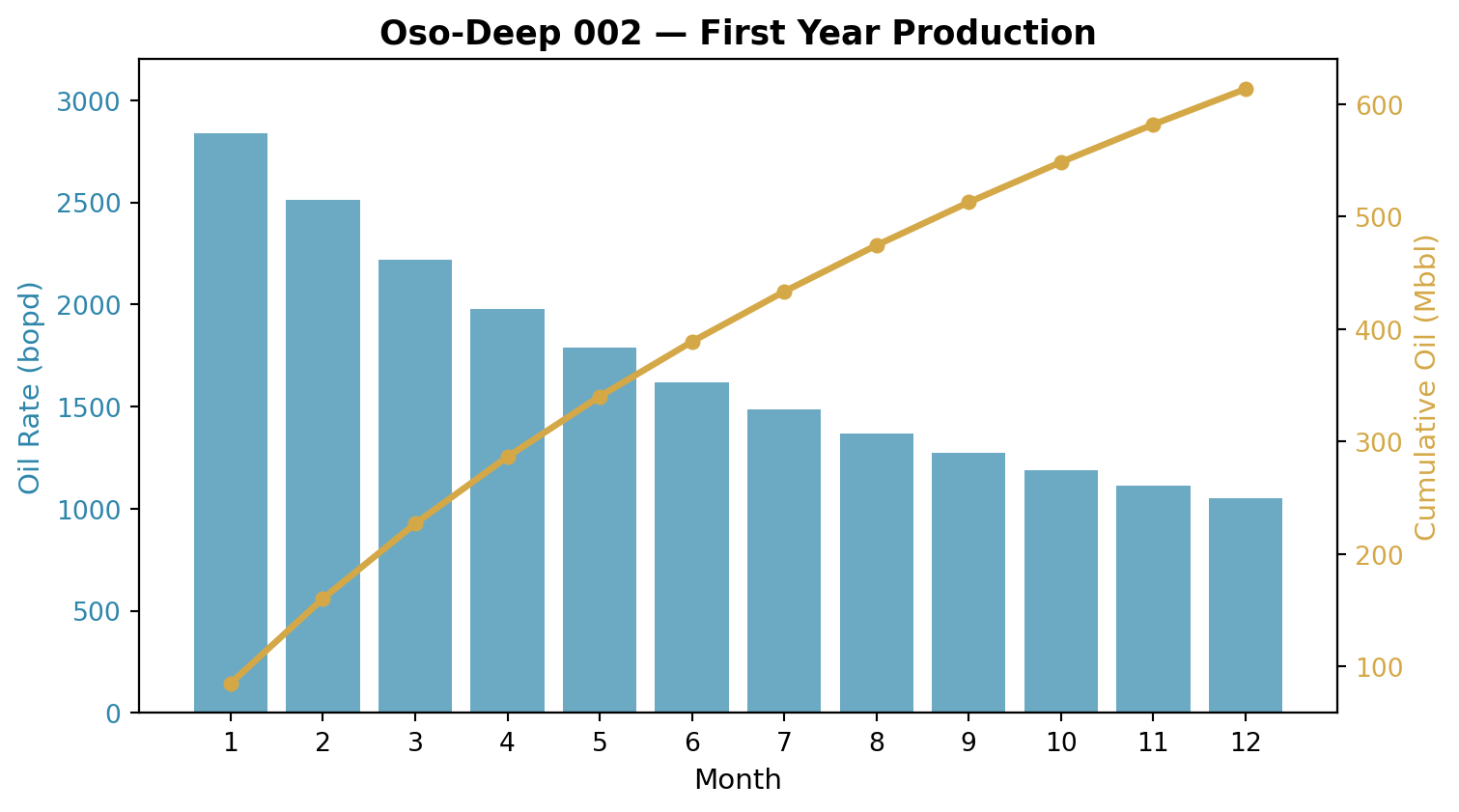
Everything in this chapter (variables, types, operators, control flow, functions, error handling) combines into tools that solve real problems. Here is a complete well screening function that evaluates whether a well is a candidate for a workover.
Summary
This chapter covered the core Python constructs through petroleum engineering applications:
- Variables store engineering quantities. Name them with petroleum terminology and units (
mud_weight_ppg,tvd_ft,oil_rate_bopd) so the code reads like engineering documentation. - Data types (int, float, str, bool) map directly to the kinds of values engineers work with: counts, measurements, labels, and conditions.
- Operators express engineering arithmetic and comparisons. The difference between
andandorin a screening criterion is an engineering decision, not a syntax choice. - Control flow (
if/elif/else,for,while) encodes decision logic, iterative calculations, and data processing: the same patterns that run inside production surveillance and well planning systems. - Functions turn one-off calculations into reusable, documented, testable tools. Write docstrings. Use type hints. Name functions after what they compute.
- Error handling (
try/except, guard clauses) makes your code robust against the messy, incomplete, sometimes contradictory data that comes from real field operations.
In the next chapter, we move from individual values to collections of data: lists, dictionaries, and the petroleum-specific file formats (CSV, JSON, LAS) that you will encounter in every engineering workflow.
Exercises
: Formation Pressure Gradient
The formation pressure gradient is the pore pressure divided by the true vertical depth, expressed in psi/ft. Normal hydrostatic gradient for a water-...
: Productivity Index
The productivity index (PI or J) measures how efficiently a well converts pressure drawdown into oil flow: J=qoPe−PwfJ = \frac{q_o}{P_e - P_{wf}}J=Pe...
: Temperature Gradient
Temperature increases with depth due to the geothermal gradient, typically 1.0–1.8°F per 100 ft in sedimentary basins. The bottomhole temperature is: ...
: Production Alert System
Write a function production_alert(well_name, current_rate, previous_rate, water_cut) that generates alerts based on these rules: If the current rate d...
: Unit Consistency Checker
One of the most common sources of error in petroleum engineering is mixed units: accidentally using a value in meters when the formula expects feet, o...
: Daily Production Report Cleaner
Every morning, the field office emails a CSV-style dump of the previous day's production. Some lines are clean. Some are missing fields. Some have a t...